Your customertypes “”|— your machine file is ready.
TrueStitch automates embroidery personalization in your Shopify store. Customers type their text, see a true stitch preview right on your product photo — and every paid order arrives with a production-ready embroidery file. No manual digitizing.
Free plan available · Works with Brother, Babylock, Tajima, Melco, Janome, Husqvarna, Pfaff & Singer files
Customer typed
“Ella”
File ready
PES • DST • JEF
Makes files for machines by
From typed name to finished embroidery
Everything between the customer's idea and your machine runs automatically — three steps, no manual handling in between.
Don't take our word for it — try it yourself
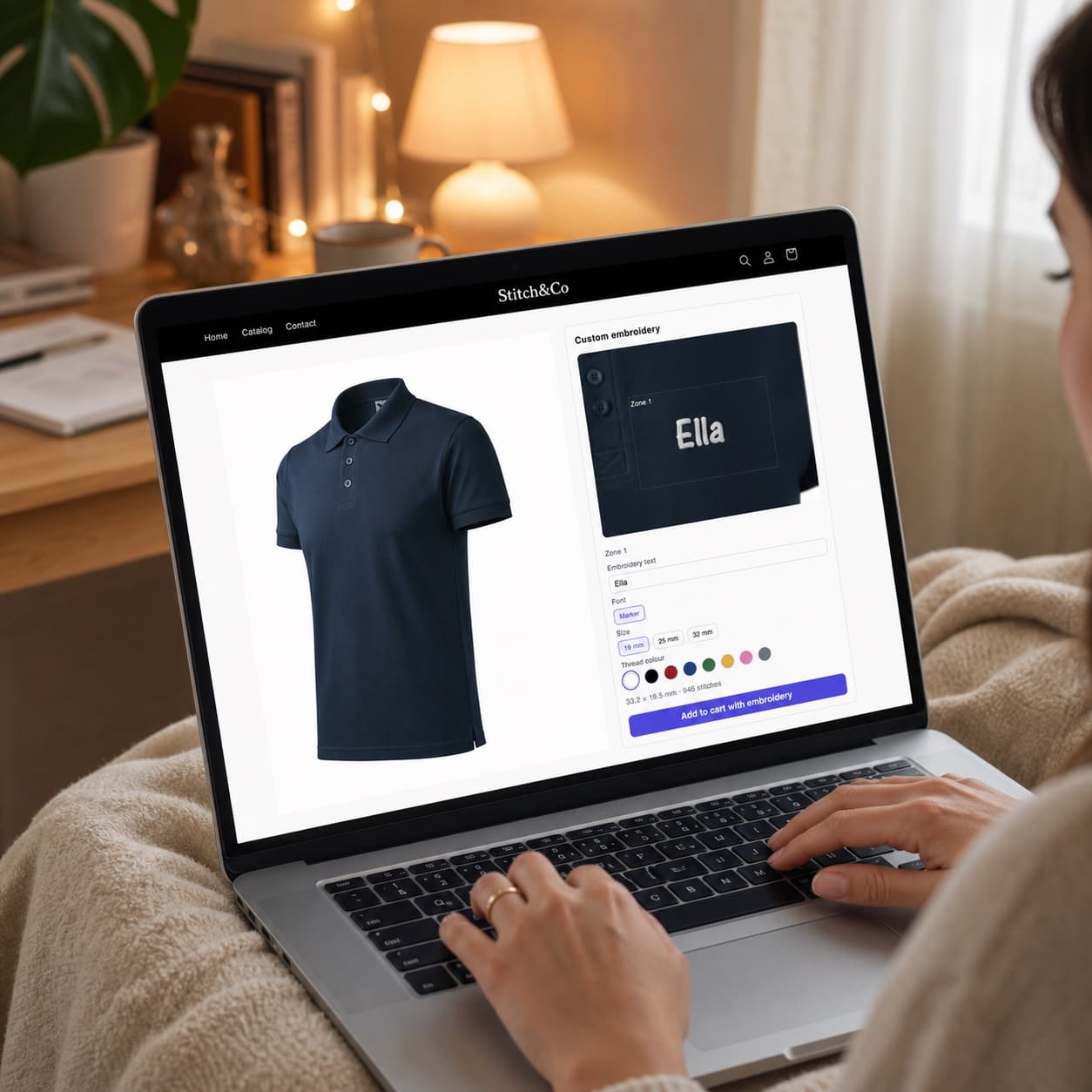
This is the live TrueStitch widget on a demo product — the exact panel your customers get on a product page. Type a name and watch real stitches appear.
- Real stitches rendered from actual stitch data — not a font overlay
- Size in millimetres and stitch count update live as you type
- Preview and machine file share one source — what you see is what you sew
Loading the live demo… If nothing appears, an ad-blocker may have stopped the script.
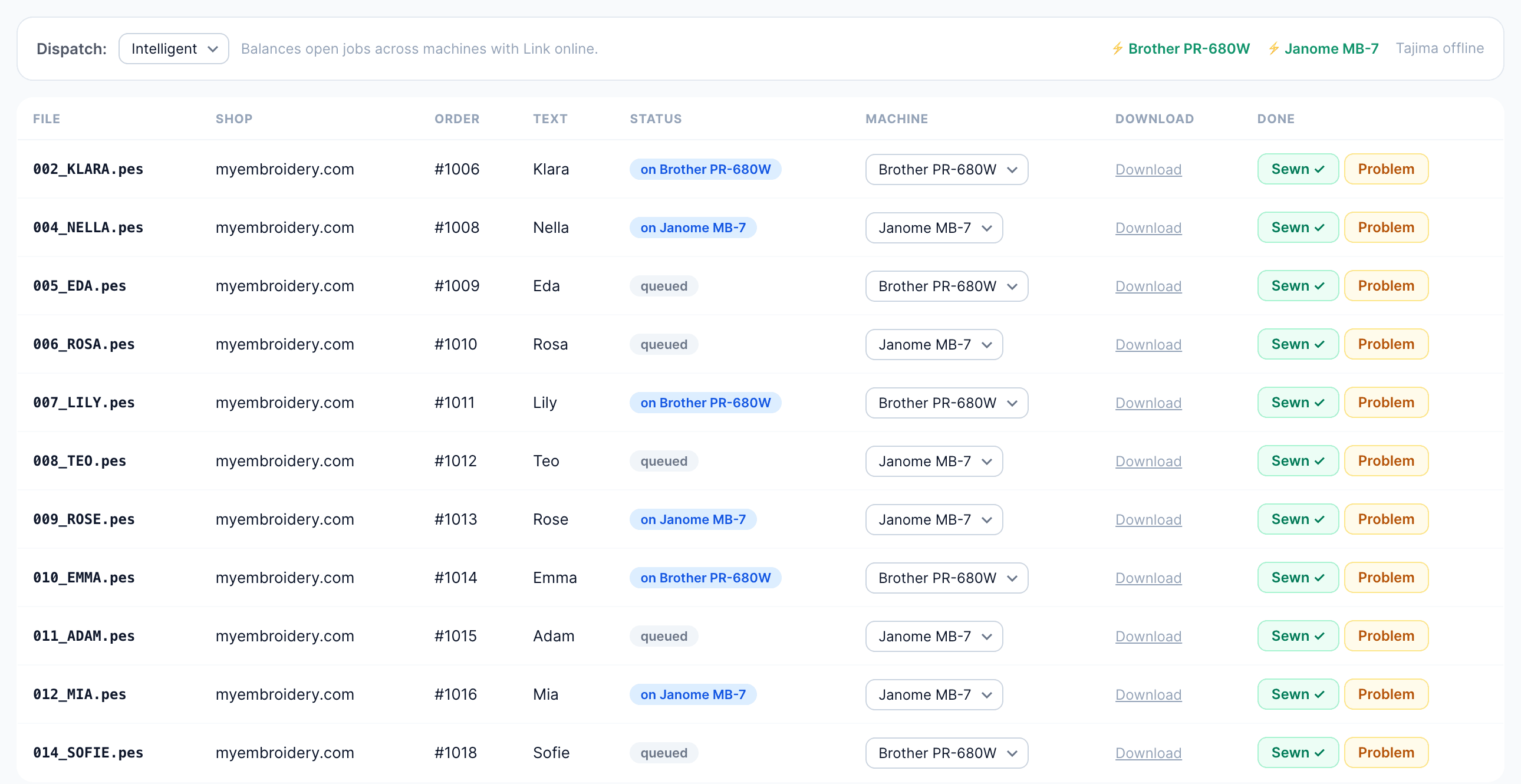
Paid orders land in one production queue
TrueStitch Cloud is your workshop dashboard: every paid order arrives with the customer's text, a stitch preview and a ready machine file. Assign a machine, send with one click, mark it sewn.
- Orders arrive the moment they're paid
- Stitch preview and personalization text on every row
- Files load onto machines by TrueStitch Link automatically
- Track what's sewn and flag problems as you go
From the queue straight to your machine
A small free app for the computer next to your embroidery machine. Pair it once and every order you send from the queue lands in the machine's memory by itself — no copying files, no flash drives.
- Watches your Cloud queue for paid orders
- Files arrive in the machine's memory automatically
- Windows and macOS, updates install silently
Free · Windows 10 and later · macOS on Apple silicon. Needs a TrueStitch Cloud workshop account — created automatically when you install the Shopify app.
TrueStitch Link
Paired with Profishot workshop
Machine
Incoming orders
Version 0.1.6 · Up to date
TrueStitch Link on the computer by your machine
Simple, transparent pricing
Start free, upgrade when your embroidery business grows. Billed through your Shopify invoice — no separate payment setup.
Starter
- 10 embroidered orders / month
- True stitch previews
- Library fonts
- PES machine files
- Multi-zone designs
Studio
- 100 embroidered orders / month
- Everything in Starter
- Upload your own fonts
- All machine formats (PES, DST, EXP, JEF, VP3, XXX)
- Email support
Pro
- Unlimited embroidered orders
- Everything in Studio
- Priority support
Frequently asked questions
How fast is the setup?
Minutes, not days. Install the app, enable embroidery on a product and TrueStitch sets up the first hoop, photo and zone automatically. Then add the widget block in your theme editor — no coding anywhere.
Which embroidery formats do you support?
PES (Brother/Babylock), DST (Tajima), EXP (Melco), JEF (Janome), VP3 (Husqvarna/Pfaff) and XXX (Singer). You pick your machine's format once in Settings; every download uses it.
How good are the generated files?
There's no automatic digitizing involved — that's the point. Your text is composed from professionally digitized letterforms with real stitch data, so the file quality is the digitizer's quality. What renders in the preview is literally the file you download.
Can I use my own fonts?
Yes. Upload your digitized alphabet as per-letter stitch files, one size at a time. A coverage grid shows which characters are still missing, and customers can only type characters the font actually has.
What does the customer see?
A personalization panel on your product page. As they type, a stitch preview renders on your product photo — exact placement, exact size, their chosen thread color.
What happens after an order?
The paid order appears in your TrueStitch Cloud queue with the preview and text. The TrueStitch Link app on the computer by your machine downloads the file to the machine automatically — or grab it with one click yourself.
Does it work outside Shopify?
TrueStitch is built for Shopify today. If you run another platform, write us — it helps us decide what to build next.
What does it cost?
Starter is free forever with 10 embroidered orders a month. Studio ($29/mo) adds your own fonts, all machine formats and 100 orders. Pro ($79/mo) removes the limits. Paid plans start with a 14-day free trial, billed through your Shopify invoice.
Ready to sew what they see?
Join the early-access stores turning their embroidery machines into a personalization business.
Install on Shopify